Colour Key
Where a selection has coverage on the map, a colour key is drawn down the right-hand edge, giving the value each colour in the heatmap stands for.
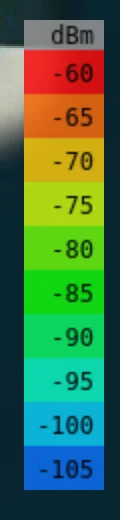
Its unit and palette are the selected object's Measured units and Colour schema from the Output group, so a network measuring received power in dBm and one measuring path loss in dB get different keys.
When It Appears
The key is tied to the selection, not to the map. It appears when you select something with results and disappears when you clear the selection. It also hides while the right sidebar is open, since the panel would cover it - close the panel to read the scale against the map.
With a Network Selected
Selecting a network only produces a key when the network has results of its own - that is, when Mesh or Merge heatmaps is on. The key then comes from the network's shared settings, and covers the whole combined heatmap.
With both off, each radio keeps its own settings, so there is no single scale to draw for the network. Select a radio in it to get that radio's key instead.